|
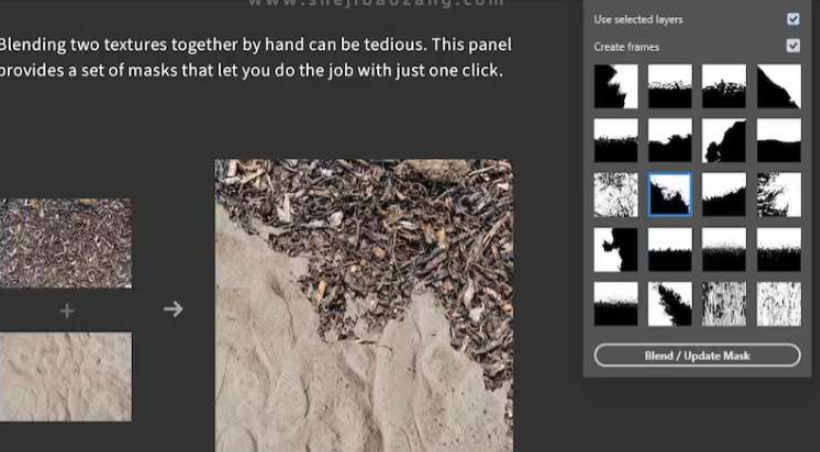
PS插件 Texture Blender – Mix Two Textures for Photoshop,一键混合融合图片 Texture Blender是一款方便的PS插件,专为解决手动混合两种纹理的繁琐问题而设计。该插件提供一组蒙版,只需一键点击,即可完成混合融合的工作。 支持版本: Photoshop 2021或更高版本。 安装步骤: - 双击texture-blender.1.0.0.ccx,Creative Cloud将自动打开并开始安装。
- 安装完成后,重启PS。在顶部菜单中,点击插件下拉,即可看到安装的Texture Blender插件。
功能详解: - 源图像: 如果打开“使用所选图层”选项,插件将混合所选图层(确保是两个)。关闭此选项,你还可以从文件系统中选择两个图像进行混合。
- 创建框架: 激活此选项后,插件将将两个图像放置在框架内。这样可以更轻松地通过拖放进行替换,快速交换图像。
- 附加提示: 处理两个图像后,你可以尝试不同的蒙版。通过再次点击按钮或双击蒙版缩略图来更新蒙版。此外,还有一个下拉菜单提供更多功能,例如将图层适应画布边界(在用另一个纹理替换一个纹理时非常有用)。
Texture Blender插件让PS中的纹理混合变得轻松,省去了繁琐的手动操作。 Description: Blending two textures together by hand can be tedious. This panel provides a set of masks that let you do the job with just one click. Functionality in Detail: - Source Images: If „use selected layers“ is turned on, the panel will blend together the selected layers (make sure it‘s exactly two). You can also select two images from your file system if you turn this option off.
- Create Frames: With this option active, the panel will place the two images inside frames. This allows for easier replacement via drag & drop, so you can quickly exchange the images.
- Addititonal Tips: After processing two images, you can try out different masks. Update the mask by clicking the button again or double-clicking a mask-thumbnail. Also, there‘s a flyout menu with more functionality, e.g to fit a layer to the canvas bounds (helpful when you replace one of the textures with another one).
|